Current Setup
My current astrophotography rig, built around a 12" f/4 Newtonian on a Paramount ME mount with a cooled mono camera and narrowband filters. Everything is remotely controlled from the house.
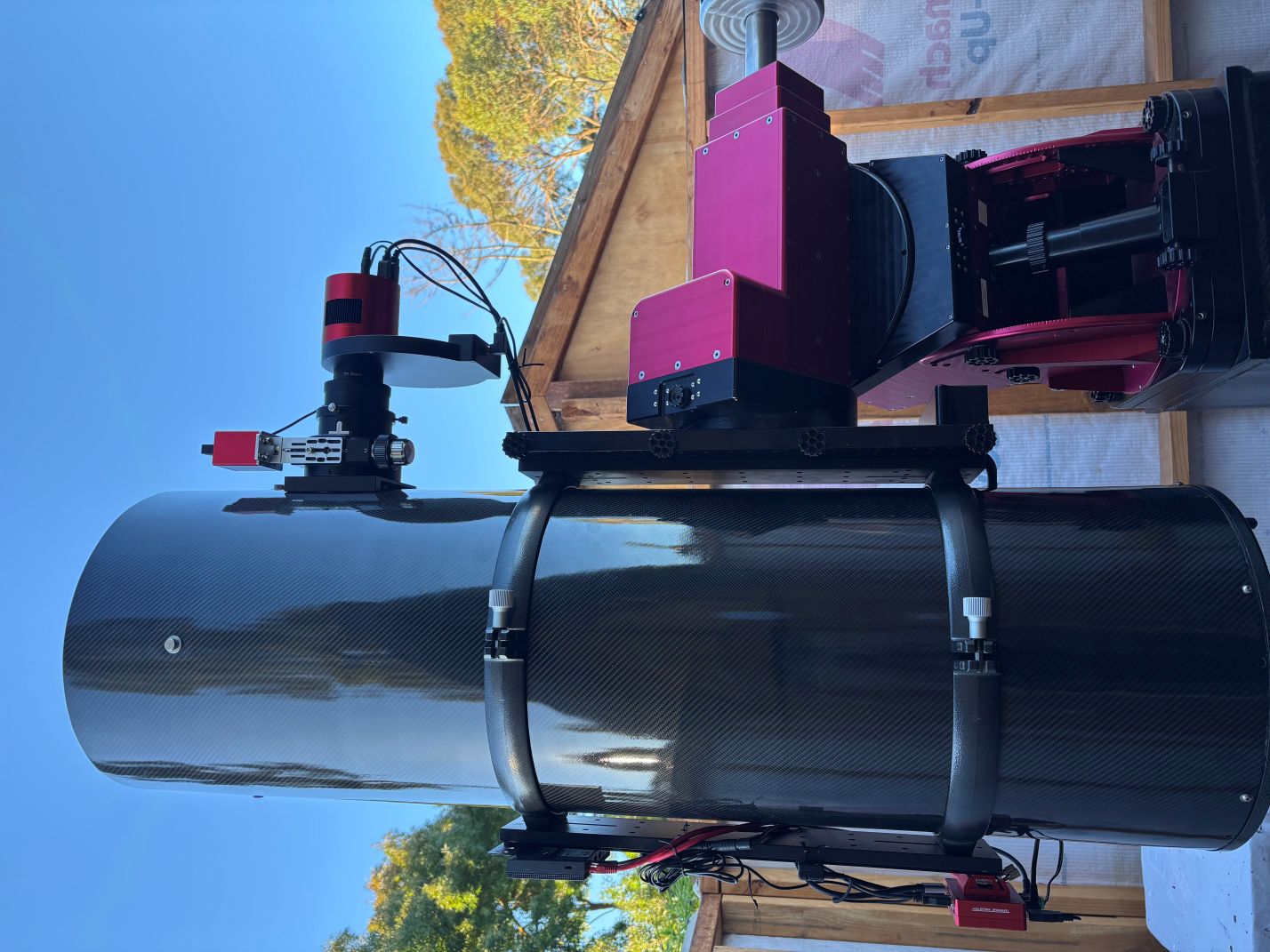
The complete imaging rig ready for a night's work
Mount
Software Bisque Paramount ME
The Paramount ME is a research-grade German equatorial mount from Software Bisque. It uses precision-ground worms running on an 11.25" 576-tooth brass RA gear, with spring-loaded worm blocks that keep backlash to a minimum, giving extremely precise tracking and pointing accuracy. The mount is rated for payloads up to 68 kg, which comfortably handles the 12" Newtonian and all accessories.
Key features:
- Research-grade worm-gear drive with spring-loaded worm blocks for minimal backlash
- Homing sensors for repeatable startup alignment
- Controlled natively by TheSky Professional via USB
- Periodic error correction (PEC) with sub-arcsecond tracking
- 68 kg payload capacity
I purchased this mount in December 2009 when I built the observatory. It's been an incredibly reliable mount that just works night after night.
Camera
ZWO ASI2600MM Duo
This is a cooled monochrome (black and white) camera with an integrated guide camera built in. The "Duo" design eliminates the need for a separate off-axis guider or guide scope by embedding a second sensor directly into the camera body.
| Sensor | Sony IMX571 (back-illuminated) |
| Type | APS-C (23.5 x 15.7 mm) |
| Resolution | 6,248 x 4,176 (26 MP) |
| Pixel Size | 3.76 µm |
| Cooling | TEC, delta -35°C below ambient |
| Read Noise | 1.0e- (at gain 100) |
| Full Well | 50,000e- |
| Weight | 1.1 kg |
| Sensor | SC2210 (1/1.8") |
| Resolution | 1,920 x 1,080 |
| Pixel Size | 4.0 µm |
| Connection | Separate USB port |
The built-in guide camera feeds directly into PHD2 for autoguiding, removing the need for a separate guide scope or off-axis guider.
Being a monochrome camera, colour and narrowband images are captured by shooting through individual filters and combining the channels in post-processing. This approach gives much higher sensitivity and flexibility compared to a one-shot colour camera.
Filter Wheel & Filters
ZWO ASI EFW (Electronic Filter Wheel)
The ZWO EFW is a motorised filter wheel that allows automated filter changes during an imaging session. N.I.N.A. controls the filter wheel and coordinates filter changes with the camera exposures, so the entire LRGB or narrowband sequence can run unattended.
Baader 2" Filters
I use a set of Baader 2-inch filters:
- L (Luminance) - captures fine detail and structure
- R (Red) - 610-700 nm
- G (Green) - 500-570 nm
- B (Blue) - 400-510 nm
Used for natural-colour images of galaxies, star clusters, and reflection nebulae.
- S (SII) - Sulphur II at 672 nm
- H (Ha) - Hydrogen Alpha at 656 nm
- O (OIII) - Oxygen III at 496/501 nm
6.5nm bandpass filters that isolate specific emission lines from nebulae. These work well even under light-polluted skies and can be combined in the Hubble Palette (SHO) for dramatic false-colour images.
Focuser
ZWO EAF on TS-Optics 3" UNCN3 Crayford Focuser
The ZWO EAF (Electronic Automatic Focuser) is a motorised focus controller that attaches to the TS-Optics 3" UNCN3 Crayford focuser. N.I.N.A. runs autofocus routines throughout the night to keep stars sharp as the temperature changes.
- Dual-speed 10:1 reduction ratio for precise manual control
- 3" drawtube accommodates the ASA 3" Wynne coma corrector
- ZWO EAF has a built-in temperature sensor for temperature-compensated focusing
- Backlash compensation handled in software
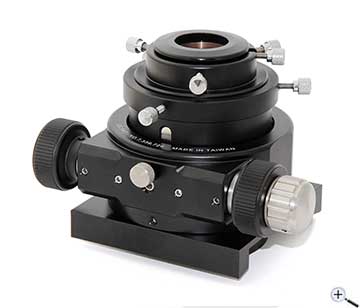
TS-Optics 3" UNCN3 Crayford focuser
Telescope
300mm f/4 Newtonian
A 12-inch (300mm) f/4 Newtonian reflector with a GSO primary mirror and a custom carbon fibre tube from Klaus Helmerichs. The carbon fibre tube is lighter, stiffer, and cools faster than the original steel tube.
| Aperture | 304.8 mm (12") |
| Focal Length | 1,200 mm (native) / 1,140 mm (with corrector) |
| F-ratio | f/4 (native) / f/3.8 (with corrector) |
| Image Scale | 0.64"/px (native) / 0.68"/px (with corrector) |
| Field of View | ~66 x 44 arcmin (ASI2600MM) |
| Weight | ~20 kg |
Coupled with an ASA 3" Wynne Corrector 0.95x to correct coma across the full APS-C sensor. See the full telescope page for detailed specifications and upgrade history.
Software & Control
Everything is controlled from an ASUS NUC mini PC mounted in the observatory, running Windows 11. I connect from the house (or anywhere) via Windows Remote Desktop.
- N.I.N.A. (Nighttime Imaging 'N' Astronomy) - the main imaging sequencer that orchestrates the entire capture session: camera control, filter changes, plate solving, autofocus, meridian flips, and dithering. Free and open source.
- TheSky Professional - planetarium and telescope control from Software Bisque. Provides native control of the Paramount ME mount including TPoint pointing model and ProTrack real-time tracking corrections.
- PHD2 - autoguiding software that reads the built-in guide camera on the ASI2600MM Duo and sends corrections to the mount. Free and open source.
- ASCOM - the standard driver platform that allows N.I.N.A., TheSky, and PHD2 to communicate with the mount, camera, filter wheel, and focuser. All hardware exposes ASCOM-compatible drivers.
- Windows Remote Desktop - used to connect to the observatory NUC from the house or remotely. The entire imaging session can be monitored and controlled without stepping outside.
- ASUS NUC (Windows 11) - compact mini PC with enough power to run all the imaging software simultaneously. Low power consumption and fanless operation keep heat and vibration to a minimum.
Observatory Automation
Three home-built ASCOM Alpaca devices let N.I.N.A. run the observatory itself, not just the telescope: a roof controller, a rain-sensing safety monitor, and a switch driver for mains power and security-camera lights. All three answer Alpaca UDP discovery on the local network, so N.I.N.A. finds them with Scan for devices and no IP addresses need typing in. The two ESP32 devices are built for unattended nights: a hardware task watchdog, a WiFi supervisor that re-associates and reboots if it can't recover, and a diagnostics log in RTC memory that survives a self-reboot so the morning status page still shows what happened.
An ESP32 DevKit-C running custom firmware that implements the Alpaca Dome interface, so N.I.N.A. can open, close and monitor the roll-off roof. The roof is pulled by a standard garage door opener, and the controller drives it the same way the wall button does: a relay wired across the button terminals gives a 250 ms pulse that steps the opener through open, stop and close.
- Two limit switches (OPEN and CLOSED) are the ground truth for roof position
- Open/close commands check the limit switches first, so a stray pulse can't close an open roof
- 2-minute movement watchdog flags an error if a limit switch is never reached
- 0.91″ OLED shows roof status and IP; a browser page gives manual control and diagnostics
- Persistent HTTP connections on the Alpaca port, so N.I.N.A.'s constant polling doesn't exhaust the ESP32's sockets
A Hydreon RG-11 optical rain sensor wired to an ESP32 that implements the Alpaca Safety Monitor interface. When the RG-11's relay closes on the first drops, the device reports not safe and N.I.N.A. can stop the sequence, park the mount and close the roof before anything gets wet.
- 5-sample majority-vote debouncing on the sensor input, so a single glitch never trips it
- 4.7 kΩ pull-up gives the relay contacts enough wetting current to stay reliable after months idle
- 1.28″ round colour display: green SAFE or red NOT SAFE ring, IP and link health
- Status page logs every rain and dry transition with a timestamp, giving an overnight rain history
A Go program running on the observatory NUC that exposes several pieces of hardware as a single Alpaca Switch device, so N.I.N.A. can turn things on and off as steps in a sequence.
- Xiaomi Mi smart plugs - the 240 V switches in the Power Management section below, driven directly over the local network with the Xiaomi UDP protocol (AES-encrypted), with no cloud round trip
- Hikvision security cameras - switches the cameras' infrared illuminators off for the night via the ISAPI interface, so they don't throw stray light across the observatory
- Each plug and camera appears as a named switch in N.I.N.A.; dew heaters, for example, can be turned on at the start of a sequence and off at the end
Power Management
Xiaomi Mi Smart Plug Mini (240V)
Multiple Xiaomi / Mi Smart Plug Mini switches are used to control 240V power to individual pieces of equipment. Each plug can be controlled via the Mi Home app on a phone or tablet, or by N.I.N.A. through the Alpaca Switch Controller above, allowing me to power on or off any component without going out to the observatory.
This is useful for:
- Power-cycling the mount or camera if they become unresponsive
- Turning on the dew heaters when humidity rises
- Shutting everything down at the end of a session from bed
- Scheduling automatic power-on before an imaging session